Friday, 8 April 2011


I now have the final layout for my front page, I have completed the second smaller story and seperated the two stories with a thin blue line and put them in seperate boxes. I have also added small finishing touches such as; who the picture was taken by in the corner of the photos, this makes the finished product seem much more proffesional.




I have now wrote the main story on the front page and one of the smaller stories. I have created a band on the main image that informs the reader on which page the story is continued and also written the same at the end of the smaller stoy.


I have also completed the left hand vertical strip on the front cover, i did this by inserting descriptions of the Tide Times and the Sailing Forecast, this was reasonably easy to do as it is just text but by using different fonts, styles, shapes and sizes still managed to make it look interesting. This is also very often seen in local newspapers.

I have inserted another image into the text of the main story on this page as this is regularly done in the stories of many editions of local newspapers.


I have added another image to the front cover, for a smaller story and used the paceholder text tool again.


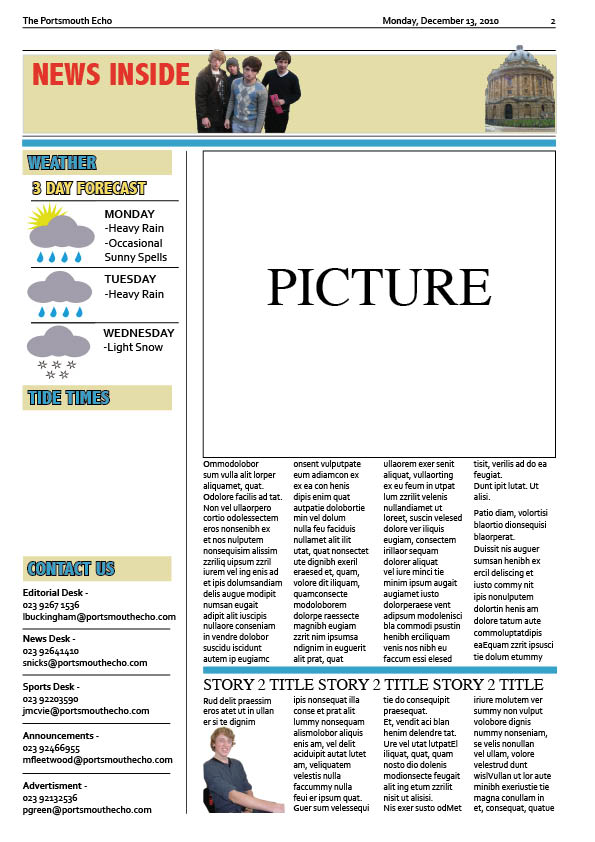
I have also added two more images to the second page. One in the top bar and also the main image of the story; I have also given this story a title that will instantly grab the attention of nearly every reader as it will most likely effect them.

I have added a 'contact us' section to the second page, as this is a regular convention of local newspapers. I have also created the space for the second story and added an image, I have predicted what it will finally look like by using the placeholder text tool again.

I have began to use one of my images on the second page for the stories that feature inside the newspaper. I have also began to create the weather forecast that features in every local newspaper. I did this by taking symbols from clip art and overlaying and adding shapes in photoshop.

I have changed the colur of the strip at the top of the page to keep with the 'Porstmouth' blue colour theme.